Learn 3DGS — an interactive course
3D Gaussian Splatting, taught with widgets you can poke rather than walls of text. Built so that by the end you can explain it to a teammate without using a single word you don't actually understand.
Seven modules. Each one is short, has at least one interactive bit, and ends with a "you can now answer" box — that's your self-test. The topic is visual at its core; reading about it without seeing it move is why books on this topic are so bad. Open the widgets, drag the sliders, break things, then read the next paragraph.
The four scenes referenced across this course are all live demos in this same project: plant, lyra, hyworld, garden. Each one is an example of a different way to build a 3DGS scene; you'll meet them in the modules below.
1 — The big idea
A 3D scene you can fly through, built from millions of fuzzy coloured blobs.
You've got some photos of a place. You'd like to render it from angles you never actually photographed — fly through it, orbit it, walk in. That problem has a name: novel view synthesis.
Before 3D Gaussian Splatting, two main answers existed:
- Photogrammetry → textured mesh. The classic pre-2020 workflow: Structure-from-Motion recovers camera poses, then Multi-View Stereo builds a dense polygon model, then textures are baked onto it from the photos. Great for solid objects, terrible for foliage, hair, smoke, glass — anything fuzzy or transparent.
- NeRF (2020). Train a neural network that, when you ask "what's at point (x,y,z) when looking in this direction?", answers with a colour and a density. Render by asking it millions of times per frame. Photorealistic — but originally minutes per image.
3DGS (2023) flipped the architecture. Instead of one neural network that you query, the scene is just a literal list of millions of fuzzy 3D blobs. To render, you project them to the screen and blend them. No neural network runs at render time.
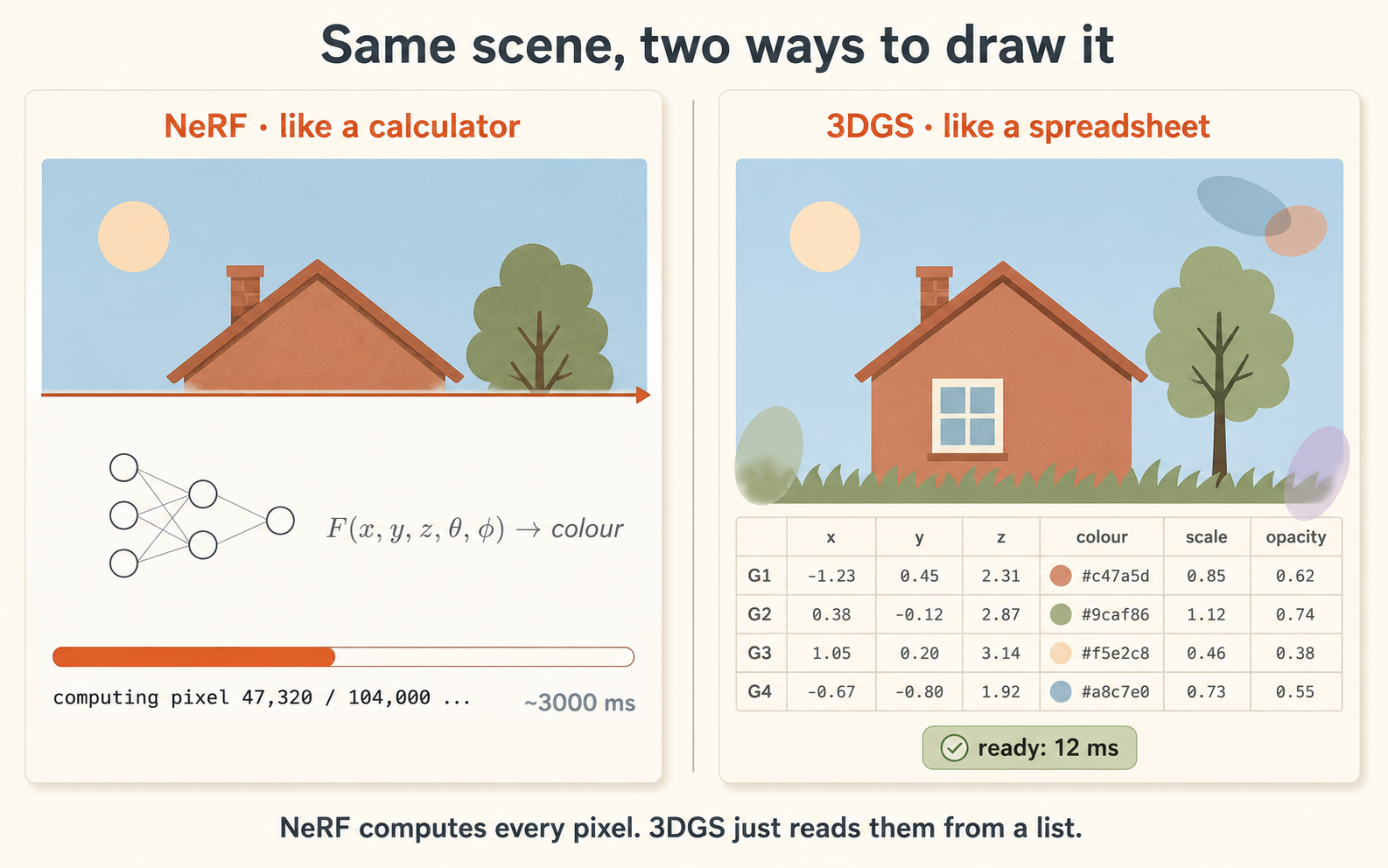
A calculator doesn't store 2+2=4 anywhere — you ask, it computes. A spreadsheet has 4 sitting in a cell — you just read it.
NeRF computes every pixel by asking a network "what's at this point?". 3DGS already has the answer written down as millions of blobs.
Look at the figure on the right. Both panels show the same
little landscape scene. The left panel paints it pixel-by-pixel
from the top down (NeRF — "computing pixel 47,320 / 104,000 ...") and
is still only half finished. The right panel shows the same scene
fully rendered, with a tiny spreadsheet of Gaussian primitives
(G1–G4: x, y, z, colour, scale, opacity) sitting behind
it — that's the data, already there, just being read. In real life
NeRF takes seconds and 3DGS milliseconds.
The payoffs of being a spreadsheet:
- Real-time rendering. 60–120 FPS, vs NeRF's seconds.
- Works in a browser. Reading data + blending is cheap; running a neural network on every pixel is not.
- Easier tooling. A list of blobs can be streamed, edited, compressed, or imported into Blender. A neural net can't.
And two facts that fall out for free:
- 3DGS files are big — a spreadsheet of millions of rows is big. NeRF's network file is small, but you pay for it on every render.
- One file per scene. Every scene gets its own spreadsheet.
❓ You can now answer
- What is "novel view synthesis"?
- Why is a textured mesh a poor fit for a garden full of leaves?
- What did NeRF do, and what was its core weakness?
- Explain 3DGS in one sentence using the spreadsheet analogy.
- Why are 3DGS files big, and why does it render in a browser?
👥 Tasks you could delegate
- Read the original 3DGS paper (Kerbl 2023) and produce a one-paragraph plain-English summary.
2 — The Gaussian
The atom of a 3DGS scene. Position, shape, opacity, colour — about seventeen numbers, and that's it.
A 3D Gaussian is one fuzzy, semi-transparent, coloured ellipsoid. Picture a soft glowing blob that's solid in the middle and fades smoothly to nothing at the edge. The blob on the right is one of them; a real scene is millions, overlapping.
Each blob stores a few numbers:
| Property | Numbers | Meaning |
|---|---|---|
| position (mean) | 3 | where the centre sits in 3D |
| scale | 3 | how long it is along its 3 local axes |
| rotation (quaternion) | 4 | how the ellipsoid is oriented |
| opacity | 1 | how solid vs see-through |
| colour (spherical harmonics) | 3–48 | flat colour, or colour that changes with viewing angle |
The numbers in the readout panel are literally what one row
of a .ply file stores for one Gaussian. The orange-tagged
phrases below drive the blob — hover or click them and watch it
morph.
Squash it flat and you get a "splat" — the disc that tiles a wall. Stretch it tall and you've got the long thin shape that fits a twig or a strand of hair. Fatten it round and it becomes a sphere — wasteful for most surfaces, which is why round Gaussians are rare.
This stretching-along-three-axes trick is called anisotropy (boring name: "ellipsoids, not spheres"). It's the reason a few million Gaussians can cover a whole scene — if they were stuck as round spheres, you'd need far more.
Try fading the opacity too. Notice the blob doesn't have a hard edge — it dissolves smoothly, denser in the middle and fading outward. The nested shells in the figure show exactly that: outer shell faint, inner core opaque. That softness is why blobs blend into a continuous image instead of looking like a heap of pebbles.
A handful of Gaussians blends into one image
A single Gaussian alone is just a soft blob. The real magic happens when you put a few of them next to each other — try the splat demo on the right. In individual mode you see four distinct fuzzy dots. Hit splat and the renderer does what it actually does at render time — projects, sorts, and blends them into a single continuous image where the four colours flow into each other. Slide the size up: as the blobs overlap more, they look like one painted scene rather than four dots. A real splatfacto scene is the same trick with millions of overlapping Gaussians.
Colour can change with viewing angle
A matte wall looks the same colour from every angle. A glossy apple has a white highlight that moves as you walk around it. To capture that, a Gaussian's colour isn't one fixed RGB — it's a small function of viewing direction, encoded as spherical harmonics (SH) coefficients:
- SH degree 0 = 3 numbers = one flat colour (show flat mode →).
- SH degree 3 = 48 numbers = colour shifts with angle — captures highlights and sheen (show view-dependent mode →).
Real SH is more subtle than the exaggerated rainbow you'll see on the right, but the principle is identical: the colour stored on each Gaussian is a tiny function, not a constant. Splatfacto outputs SH-3; our Lyra and WorldMirror outputs are SH-0 (flat).
❓ You can now answer
- What numbers define a single Gaussian?
- What does the bell curve do for us at the edge of a blob?
- What is anisotropy and why does it make 3DGS efficient?
- What's the difference between SH degree 0 and degree 3?
- Why do our pipelines export with different
shDegvalues?
👥 Tasks you could delegate
- Open one of our
.plyfiles in a hex/text viewer and confirm the properties listed match the table above.
3 — Building a scene
From a folder of photos to millions of fitted Gaussians, via "differentiable rasterization" (a renderer that runs backwards).
Classical 3DGS builds a scene by per-scene optimization — each scene gets its own little training run. Roughly:
Step 1 — recover the cameras (COLMAP / SfM)
Before any Gaussians, you must know where each photo was taken. The figure on the right shows what COLMAP needs: many overlapping shots of the same subject, taken from positions all around it. COLMAP detects features in every photo, matches them, and solves for each camera's 3D position and orientation. As a by-product it gives you a sparse 3D point cloud — a few thousand confident 3D points.
Step 2 — initialise the blobs
Put one Gaussian at each COLMAP point. Maybe 100k blobs. Random sizes, rough colours. This is the seed.
Step 3 — the training loop, repeated ~30,000 times
- Pick a training photo (whose camera you know).
- Render the current Gaussians from that camera → predicted image.
- Compare predicted vs real photo → a single number called the loss.
- Backpropagate — because the renderer is differentiable, you can compute, for every Gaussian, which way to nudge it to make the next render less wrong.
- Update every Gaussian by that nudge.
"Differentiable" sounds scary; it just means the renderer also runs backwards. A normal renderer goes scene → image. A differentiable one also tells you, given "the image was wrong here", which Gaussian to blame and by how much. That backward signal is what makes optimization possible at all.
Step 4 — adaptive density control
While training, the optimiser also adjusts how many Gaussians exist:
- Clone / split Gaussians where the picture is still blurry.
- Prune Gaussians that have gone transparent or absurdly large.
So the count grows from ~100k to several million, concentrated where the scene needs detail. Total wall time: minutes to an hour on one GPU.
The plant demo is exactly this pipeline: phone video → frames → COLMAP → 30k iterations → splat. ~30 minutes end-to-end on one GPU.
❓ You can now answer
- What does COLMAP do, and why must it run before training?
- Walk through one iteration of the optimization loop.
- What does "differentiable rasterization" really mean?
- What does adaptive density control do during training?
- Why is classical 3DGS called "per-scene", and why is that a limit?
👥 Tasks you could delegate
- Capture a new scene following the recording recipe in `CLAUDE.md` §B and run `run_nerfstudio_big.sh` end-to-end.
- Compare `splatfacto` vs `splatfacto-big` on the same capture and report gaussian count / sharpness / file size.
4 — Rendering in the browser
Project, sort, blend. Three steps, no neural network, GPU-friendly — which is why it runs at 60 FPS in a tab.
For every frame, for every Gaussian:
- Project its 3D ellipsoid onto the screen. A 3D ellipsoid projects to a 2D ellipse — a "splat".
- Sort all splats by depth (far → near).
- Blend them front-to-back: each splat contributes
colour × opacity × its 2D Gaussian falloff, accumulated until the pixel is opaque.
That's it. Project, sort, blend. No ray-marching, no neural network. This is "rasterization" — the work GPUs were built for — which is why it's real-time where NeRF's per-pixel network queries were not.
The only fiddly part is the sort: it has to be redone every time the camera moves (the depth order changes). Modern viewers do this fast enough on a GPU.
The scene on the right is 2.3 million of the blob from module 2
This is the WorldMirror "Statue Face" scene. Click load, then drag to orbit. There's no mesh, no texture, no shader — just millions of overlapping Gaussians being projected and blended in real time.
Viewers and file formats
| Format | What it is | Notes |
|---|---|---|
.ply | raw training output | big; all properties explicit |
.splat | antimatter15's compact binary | 32 bytes/Gaussian |
.ksplat | mkkellogg's chunked format | compression 1 = 16-bit, ~65% smaller |
.spz | Niantic's compressed format | gzip-friendly for the web |
Viewers: antimatter15's web viewer (the original), mkkellogg GaussianSplats3D, and Spark (sparkjs.dev — what every demo on this site uses).
Coordinate gotcha. Different pipelines assume different "up" axes. Splatfacto PLYs are +Z-up; Lyra and WorldMirror are +Y-down (OpenCV-style). You fix this with a one-line rotation on the splat mesh in the viewer. Get it wrong and the scene loads upside-down.
❓ You can now answer
- What are the three steps of rendering a splat?
- Why is splatting real-time when NeRF rendering wasn't?
- Which step has to be redone every time the camera moves?
- When would you use `.ksplat` instead of `.ply`?
- Why do some scenes load upside-down, and how is it fixed?
👥 Tasks you could delegate
- Build a new viewer page for a scene (clone an existing `index.html`, swap the asset, set the rotation).
- Benchmark the same scene as `.ply` vs `.ksplat` — load time, file size, visible difference.
5 — Splat → mesh
Splats are great to look at, but they aren't surfaces. Sometimes you need an actual polygon mesh — and getting one is lossy.
A splat is a cloud of overlapping fuzzy blobs. No faces, no edges, no "skin". For most viewing, that's fine. But game engines (Unity, Unreal), physics, collision, and standard 3D tools all expect a mesh. A mesh is also much smaller and renders on any hardware.
The problem: you have to extract a surface from blobs that were never a surface. Main approaches:
| Method | Idea | Trade-off |
|---|---|---|
| Poisson | treat blob centres as an oriented point cloud, fit a watertight surface | smooth; over-blurs detail |
| Marching cubes | sample combined density on a 3D grid, extract isosurface | faithful; needs a fine grid |
| TSDF fusion | render depth maps from many views, fuse into a volume | good geometry; needs render step |
| SuGaR / 2DGS | train the splat to be surface-like in the first place | best meshes; must retrain |
The honest catch: it's lossy. Splats can represent fuzzy things — leaves, hair, grass — that genuinely aren't surfaces. A mesh of a garden will always be blobbier than the splat.
The widget on the right is the garden demo — click Load to compare the original splat or the Poisson mesh we extracted from it. Useful for seeing exactly what mesh extraction throws away.
The recipe (see garden-mesh-viewer repo): parse the splat → drop low-opacity floaters + huge background blobs → crop to the central region → estimate normals → Poisson depth 11 → keep the largest connected component → transfer per-vertex colour from the nearest splat. The lesson: naive Poisson on the raw splat is a blobby mess; filtering and cropping before reconstruction is the whole game.
❓ You can now answer
- Why isn't a splat already a mesh?
- Give three reasons you'd want a mesh instead of a splat.
- Name two splat→mesh methods and their trade-offs.
- Why is splat→mesh fundamentally lossy?
- What did filtering and cropping do for the garden mesh?
👥 Tasks you could delegate
- Tune `splat_to_mesh.py` parameters (bbox, opacity cutoff, Poisson depth) on a new scene and compare results.
- Try a marching-cubes or SuGaR path and benchmark against our Poisson output.
6 — Beyond per-scene optimisation
Two newer families that break the "30 minutes per scene, needs many photos" wall: feed-forward (~1 second) and generative (makes up unseen parts).
Feed-forward reconstruction (~1 second)
Train one big neural network on thousands of scenes. At test time, give it a few images and it predicts the Gaussians directly in one forward pass. No per-scene optimization. About one second instead of thirty minutes.
- Lineage: DUSt3R → MASt3R → VGGT → WorldMirror.
- It also predicts the camera poses itself — no COLMAP needed.
- Slightly softer than a fully-optimized splat — it generalizes from training data instead of fitting your specific scene.
The hyworld demo is this — Tencent's WorldMirror 2.0. We swept 14 scenes; each ran in ~1 second on one GPU at 2.35 GB VRAM.
Generative (hallucinates unseen views)
Use a diffusion model to imagine a scene — or the video of moving through it — from a text prompt or one image, including the parts that were never photographed.
- Lyra 2.0 — one image → diffusion generates an orbit video → gsplat optimization turns the video into a clean splat. The diffusion invents the unseen sides of the scene.
- HunyuanWorld 2.0 — a full 5-stage pipeline: text/image → panorama → trajectories → photoreal video → splat. See HUNYUANWORLD_PIPELINE.md for stage-by-stage detail.
The trade-off, on one slide
| Optimisation (classical) | Feed-forward | Generative | |
|---|---|---|---|
| Input | many photos | a few images | text or 1 image |
| Speed | ~30 min/scene | ~1 second | seconds–minutes |
| Faithful? | yes | mostly | partly — hallucinates |
| Unseen areas | holes | weak | invented plausibly |
| Demo | plant | hyworld | lyra |
❓ You can now answer
- What does "feed-forward" mean, and how is it different from per-scene optimization?
- Why does WorldMirror not need COLMAP?
- What does a generative method add that optimization cannot?
- Where does Lyra use diffusion, and where does it use optimization?
- Classify each of our four demos as optimization / feed-forward / generative.
👥 Tasks you could delegate
- Run WorldMirror on a fresh image set and report inference time + gaussian count.
- Read `HUNYUANWORLD_PIPELINE.md` and present back the 5 stages.
7 — The landscape & where we fit
Image / prompt → explorable 3D world. The same target World Labs and Marble are chasing. 3DGS is the rendering layer that makes it practical.
Our four demos cover the three families end-to-end:
What's still hard (open problems to speak to)
- Unbounded scenes — skies and far backgrounds have no clean surface; meshes break here.
- Dynamic scenes — moving content needs 4DGS (one extra time dimension); active research.
- Relighting / editing — a baked splat has lighting frozen in; editing it is mostly unsolved.
- Multi-GPU cost — the full generative pipelines (HunyuanWorld's upper stages) still need clusters.
Glossary (the words you can now use without faking it)
3DGS 3D Gaussian Splatting. Gaussian a fuzzy coloured ellipsoid; the scene primitive. NeRF earlier neural, implicit ("calculator") scene representation. Novel view synthesis rendering a scene from unphotographed angles. COLMAP / SfM recovers camera poses + sparse points from photos. Rasterization / splatting project-sort-blend rendering. Differentiable rendering a renderer that also runs backward. Adaptive density control clone / split / prune during training. Spherical harmonics (SH) encodes view-dependent colour. Anisotropy Gaussians stretching unequally along their 3 axes. Feed-forward reconstruction predict the splat in one network pass. Diffusion model generative model; here, imagines unseen views. Poisson reconstruction fits a watertight mesh to oriented points. .ply / .splat / .ksplat / .spz splat file formats.
Where to go next
- READING.md — the paper list (start with Kerbl 2023, the 3DGS paper).
- HUNYUANWORLD_PIPELINE.md — the full generative pipeline.
- CLAUDE.md — the hands-on playbook for every pipeline in this repo.
❓ You can now answer (whole-topic check)
- Explain 3DGS in two sentences to a non-expert.
- How does a pile of photos become a splat?
- Why does it render in a browser when NeRF couldn't?
- How — and why — do you turn a splat into a mesh?
- What is HunyuanWorld 2.0, and how does it differ from classical 3DGS?
- Which of the three families does each of our four demos belong to?
👥 Now you can scope teammate work
- Capture & optimization (module 3): a teammate films + trains.
- Viewer / front-end (module 4): a teammate builds new pages.
- Mesh extraction (module 5): tune parameters, try new methods.
- Model testing (module 6): run WorldMirror / Lyra on new inputs.